Overview
This document describes the Mandate Flows for Reference Numbers, which enables automatic recurring payments using the Google Standard Payments rails.
How the flow works
The diagram below shows the steps involved in the mandate creation of Reference Numbers:
Create Mandate With Optional Instant Payment Flow
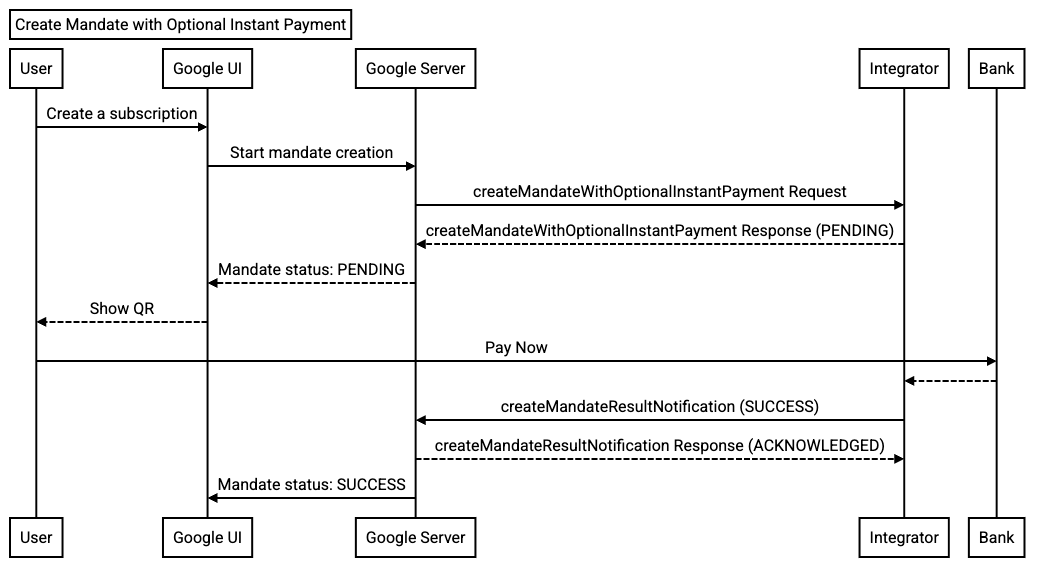
The objects in the diagram include the following:
- User: This is the person who wants to set up a subscription through Google.
- Google UI: The interface, where the customer begins to make a purchase using subscription.
- Google Server: The backend server at Google that sends the mandate creation command to the Payment Integrator Server.
- Payment Integrator Server: The backend server of the integrator that accepts the request for a mandate creation.
In this flow, the user is in session. They begin the flow by starting to start a subscription.
- The user begins to start a subscription through the Google UI.
- The subscription details are sent to the Google Server.
- Google's Server sends the CreateMandateWithOptionalInstantPayment request to the Payment Integrator Server. This request includes mandateDetails such as the subscription amount, frequency, and start/end dates. It may also include an instantPaymentAmount if applicable.
- The Payment Integrator Server validates the
CreateMandateWithOptionalInstantPaymentrequest. - If the request is valid, the Payment Integrator creates the mandate on the user's account.
- The Payment Integrator Server sends back a Success response to the Google Server. The response includes a Reference Number/QR Code.
- The Reference Number/QR Code is the shown to the user.
- The user copies the reference number and goes to their bank's app or website to pay. They manually enter the reference number or use a QR code scanner, then authorize the payment in their bank app.
- The bank confirms the payment and the mandate creation. The Payment Integrator receives confirmation from the bank, confirms the mandate creation, and sends the mandate details (mandateId, etc) back to Google.
- Google's Server stores the mandate details, including the mandateId.
- The Google Server sends back a Success response to the Google UI.
- The subscription is set up for the user.