
This guide explains how the Google Meet REST API lets you create and manage meetings for Google Meet.
A meeting space represents a virtual place or a persistent object (such as a meeting room) where conferences are held. Only one active conference can be held in one space at any time. A meeting space also helps users meet and find shared resources.
To work with meeting spaces, see Create and manage meeting spaces. To learn how to programmatically configure a meeting space, see Configure meeting spaces and members.
How to call the meeting space methods
The following table details the meeting roles required to use the meeting space methods:
| Method | Owners | Participants | Others |
|---|---|---|---|
endActiveConference |
x | ||
get |
x | x | x |
| with settings | x | ||
| with active conference | x | x | |
patch |
x |
How Meet identifies a meeting space
The Google Meet REST API generates a
spaces resource for each
meeting space. The spaces resource offers multiple entry points for joining a
conference.
The following table shows how to identify and join a meeting space:
| Field name | Description |
|---|---|
name |
The name of the space. The {space} string is the resource
identifier for the space and is formatted as spaces/{space}.
It's a unique, server-generated ID and is case sensitive. For example,
spaces/jQCFfuBOdN5z. |
meetingCode |
The alias for the space name. The {meetingCode} is a typeable,
unique character string and is non-case sensitive. It's formatted as
spaces/{meetingCode}. For example,
spaces/abc-mnop-xyz. The maximum length is 128 characters.
It forms part of the meetingUri:
https://meet.google.com/abc-mnop-xyz. |
phoneAccess |
The phone access methods for this meeting space. The phoneAccess object contains information required to dial into a conference including the regional phone numbers for the meeting space and a PIN code specific to that phone number. The PIN consists of only decimal digits and the length might vary. For example, "pin": 19707127300. Similar to the Meet UI, the spaces resource includes a limited set of dial-in numbers. You can see additional phone numbers for a meeting space by appending the {meetingCode} to the following URL: https://meet.google.com/tel/. For example, https://meet.google.com/tel/abc-mnop-xyz.
|
gatewaySipAccess |
The Session Initiation Protocol (SIP) access methods for this meeting space. A SIP address details how third-party video conferencing hardware can find and join a Meet conference. The gatewaySipAccess object contains a URI and numeric access code. Meet supports the SIP URI scheme. |
To manage a meeting space, use the following values for the
name field:
To get details about a meeting space, you can use either
spaces/{space}or the aliasspaces/{meetingCode}. For more information, see Get a meeting space.To update the details of a meeting space, you can only use
spaces/{space}. For more information, see Update a meeting space.To end an active conference within a meeting space, you can only use
spaces/{space}. For more information, see End active conference.
Lifecycle of a meeting space
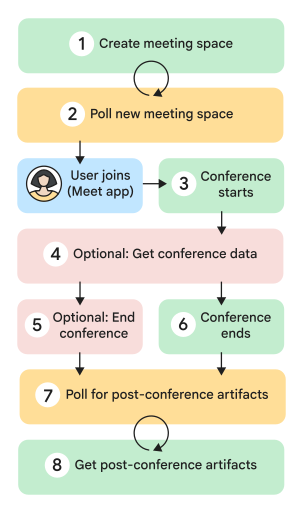
A meeting space goes through several states during its lifecycle. The following diagram shows the high-level steps of a meeting space lifecycle:
Call
spaces.create. The meeting space is created and the returnedspacesobject contains themeetingUristring. ThemeetingUriis then distributed to participants.Poll the new meeting space. Call the
spaces.getmethod to check the conference state.Instead of polling, you can also subscribe to Meet events to receive push notifications.
Start the conference. When the first participant clicks the
meetingUriinside the meeting space, a conference starts. TheactiveConferenceobject is populated and theactiveConference.conferenceRecordstring is set.(Optional) Get conference data. During an active conference, you can access some
conferenceRecordvalues. For example, call theconferenceRecords.participants.listmethod to see all participants in the conference. You can also access this information for up to 30 days after the conference.(Optional) End the conference. During the conference, the meeting owner can call the
spaces.endActiveConferencemethod to programmatically end an active conference for all participants.The conference ends. When the last participant leaves, the conference ends.
Poll for post-conference artifacts. The conference has ended (
STATE=ENDED) but the artifacts haven't been generated yet. ThestartTimeandendTimefor the conference are also populated. You must poll the artifact endpoint until the artifact objectSTATEreadsFILE_GENERATED.Instead of polling, you can subscribe to Meet events to receive push notifications.
Get post-conference artifacts. You can retrieve artifacts like recordings and transcripts once they are generated. For example, call the
conferenceRecords.recordings.getmethod to get a recording by recording ID.Once ready, a URI to the artifact object is populated and returned as part of the resource object.
Related topics
- Create and manage meeting spaces
- Configure meeting spaces and members
- Join a meeting
- Countries where you can use a phone with Meet