
Page Summary
-
For legacy Action feed integration, refer to the legacy feed reference or contact your Google representative if unsure which version is enabled.
-
To create and upload action feeds, follow the action feed specification, using unique, timestamped filenames for action data files and setting the
namefield in the fileset descriptor toreservewithgoogle.action.v2. -
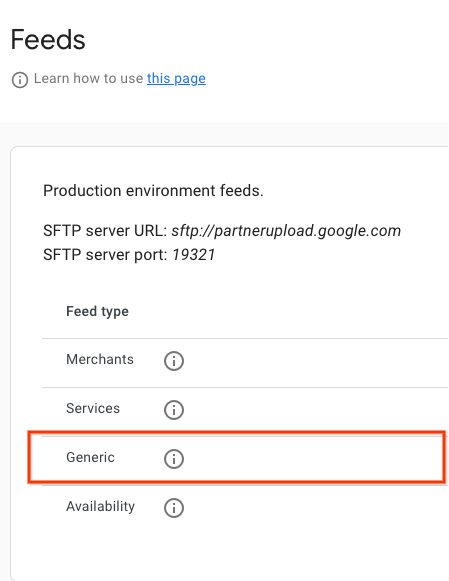
Upload feeds as full refreshes daily to the generic SFTP server, whose details are found in the Partner Portal's Configuration > Feeds section.
-
You can monitor the ingestion status of your feeds in the Partner Portal under Feeds > History.
-
While the Action feed spec is defined in protobuffer format, uploading feeds in JSON format is recommended, and sample JSON feeds are available for reference.
Create and upload action feeds
When creating and uploading action feeds, follow these instructions:
- Follow the spec described in the
action feed
for action data files. We recommend using unique action data file names for each upload.
Include a timestamp in the filename, for example,
action_1633621547.json. - In the fileset descriptor, set the
namefield toreservewithgoogle.action.v2. For an example of the descriptor file, refer to the JSON sample. We recommend using unique descriptor file names for each upload. Include a timestamp in the filename, for example,action_1633621547.filesetdesc.json. The descriptor file must be uploaded to the generic SFTP server. - Upload feeds to the generic SFTP server daily as full refreshes.
- You can find SFTP server details in the Configuration > Feeds section of the Partner Portal.
- View feed ingestion status in the Feeds > History section of the Partner Portal.
Definitions
ActionFeed Definition
message ActionFeed {
  repeated ActionDetail data = 1;
}
ActionDetail Definition
message ActionDetail {
  string entity_id = 2;
  string link_id = 3;

  // Deep link for action detail
  string url = 4;
  repeated Action actions = 1;
}
AppointmentInfo Definition
message AppointmentInfo {
}
Action Feed samples
Action Feed
{
  "data": [
    {
      "entity_id": "appointments-merchant-1",
      "link_id": "appointment-link-1",
      "url": "https://www.partnerwebsite.com/appointment/appointment-partner-1",
      "actions":[
        {
          "appointment_info": {}
        }
      ]
    }
  ]
}
Descriptor File
{
  "generation_timestamp": 1677540395,
  "name": "reservewithgoogle.action.v2",
  "data_file": [
    "action_1677540395_0001.json",
    "action_1677540395_0002.json"

  ]
}